v1.5.2is out. Read the notes

Your workspace runs on one file.

A self-hosted alternative to Notion: block-based docs, databases and real-time collaboration in one Go binary. And ChatGPT, Claude or Cursor can work in it directly, with the access you grant them.

AGPL-3.0 · free software, including at work

$ curl -fsSL https://raw.githubusercontent.com/salt-md/salt.md/main/install.sh | sh

Downloads the prebuilt binary for your platform, then starts on port 8420.

  • 1process to run
  • 1file to back up
  • 0external services
  • 1:1AI and human access
Alternatives

Self-hosted, without the stack underneath it.

The hosted ones store your pages on their servers. The self-hostable ones ask you to run a database server, a cache and an object store before you can write anything. Salt.md is one process and one file.

ToolRuns onServices to runReal-time collaboration
Salt.mdYour server1Yes
NotionTheir serversHosted for youYes
TrelloTheir serversHosted for youYes
DocmostYour server3Yes
OutlineYour server3Yes
AppFlowy CloudYour server11Yes
ObsidianYour own machineNoneNo

Notion, Trello, Obsidian, Docmost, Outline and AppFlowy are trademarks of their respective owners. Salt.md is an independent project, not affiliated with or endorsed by any of them, and names them here only to describe what it is an alternative to.

Service counts are the containers in each project's own docker-compose.yml, checked on 26 July 2026. Docmost and Outline each add PostgreSQL and Redis. The AppFlowy figure is its self-hosted backend, AppFlowy-Cloud, which adds a gateway, object storage, an auth service, a worker, a search service and an AI service on top of those — the desktop app is a separate component and is not what that number counts. docmost/docmostoutline/outlineAppFlowy-IO/AppFlowy-Cloud

Try it

Or just have a click around.

The real thing, running in your browser — the editor, the databases, the search. No account, no server, nothing saved.

salt.md — demo workspaceOpen full screen ↗
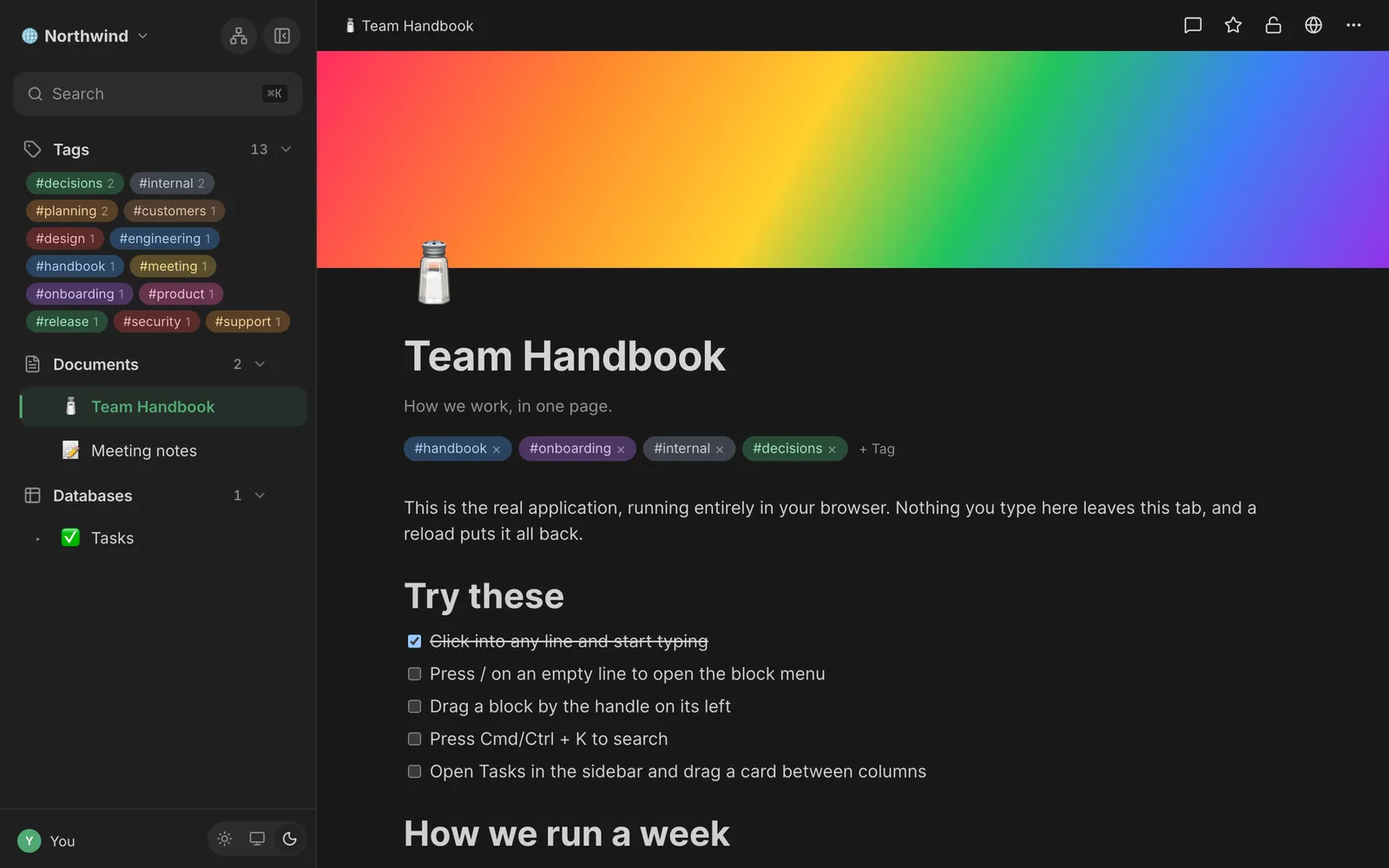
Salt.md with a document open: the sidebar shows tags, documents and databases; the page has a cover, a title and a checklist.

The real application, with the server replaced by a store in your own tab. Whatever you change is yours alone and gone when you reload.

Interactive setup

Let your assistant install it with you.

Paste this into ChatGPT, Claude, Gemini, Copilot or whatever you already have open. It reads the machine-readable docs and then walks you through it, asking about your setup before it hands you commands.

Works in any assistant that can open a URL. If yours cannot browse, paste the contents of llms.txt after the question. llms.txt

Prompt

Read https://salt.md/llms.txt in full, then walk me through self-hosting Salt.md and connecting you to it over MCP. Ask me what operating system, hosting and domain I have before giving me any commands, and give me one step at a time. Flag the licence terms and the security pitfalls as we reach them rather than at the end.

What you get

A real workspace, not a note file.

Everything below ships in the binary you just downloaded. There is no paid tier holding features back.

Latest · v1.5.2

One binary.
One file.
Everything in it.

  • No database server
  • No sync service
  • No account anywhere
the whole app
18 MB
default port
8420

Block editor

Type / and the toolbox opens: headings, lists, code, tables, callouts, columns. Every page is stored as open block JSON, never a proprietary format.

Databases with views

Turn any page into a database. Table, board and gallery — each view keeps its own filters, sorts and columns.

Running it is not reading it

Four roles, and the line between them holds: an admin manages people, not content. Reaching a workspace you are not in takes time-boxed, written, audited emergency access — and its admins are told.

Real-time collaboration

Live cursors and presence, and offline edits that merge on reconnect. The sync server is the same process.

Your assistant works here too

Anything you can do in the interface, ChatGPT, Claude or Cursor can do over MCP. Same API, same permissions, same audit trail, scoped by token.

Search that finds passages

Not just the page — the paragraph in it. The index speaks German as well as English, and the model runs inside the binary.

Yours to take away

Markdown in and out, a workspace archive that moves everything 1:1, and the SQLite file itself.

Speaks your language

Interface, dates and times follow the reader, automatically or by hand. A new language is one command, and the build fails if a string is left behind.

Also in the box
  • Relations & rollups
  • Formulas
  • Comments
  • Backlinks
  • Version history
  • Templates
  • Trash & restore
  • A private space per account
  • Offboarding with a successor
  • 2FA & OAuth
  • Public links
  • Public forms
  • iCal feed
  • Activity log
  • PWA / offline
  • Live backups
See every feature
How it runs

One process. That is the whole architecture.

No Postgres to babysit, no Redis, no sync server, no S3 bucket. The binary is statically linked with a pure-Go SQLite, so there is nothing to install underneath it.

  • Backups are a file copy

    Everything lives under one data directory. The built-in snapshot is transactionally consistent and safe to take while the instance is running.

  • Runs on the small box you already have

    A Raspberry Pi, an old NUC, a 5 € VPS. No container orchestration required, though a multi-arch Docker image is there if you prefer one.

  • Upgrades are one binary swap

    Replace the file and restart. Open tabs notice the version change and reload themselves.

saltrunning
salt  (single Go binary)
├── REST API (net/http)
├── MCP server (/mcp, JSON-RPC)
├── Yjs relay (WebSocket)
├── SSE change feed
├── SQLite + FTS5 (pure Go, no CGO)
└── embedded React frontend
    (Vite + BlockNote + Yjs)
1 process to run1 file to back up0 external services
claude mcp add --transport http salt https://your-host/mcp \
  --header "Authorization: Bearer <your-token>"
  • Search, read and write every page
  • Create databases, views and rows
  • Scoped to one workspace, or read-only
AI-native

Your assistant gets the same workspace you do.

ChatGPT, Claude and Cursor work in your workspace directly, over the Model Context Protocol — searching it, writing pages, restructuring databases and importing from any JSON API, with the content never passing through their context window. Not a chatbot bolted onto a sidebar: the interface they connect to ships in the binary.

How the MCP server works
Questions

The ones that decide it.

Anything else is best asked where the code is: open an issue.

Is Salt.md open source?
Yes. It is free software under the GNU Affero General Public License v3.0, which is OSI-approved. Use it anywhere, including at work, with no fee and no separate licence. The one condition is the AGPL's: if you change it and let others use your changed version over a network, you publish those changes. Running it unmodified asks nothing of you.
What do I need to run it?
A machine that can run a single binary. No database server, no runtime, no dependencies — SQLite is compiled in and the frontend is embedded. Linux and macOS binaries are prebuilt for amd64 and arm64; a Docker image covers both too.
Where is my data?
In one directory you choose, containing a SQLite file and your uploads. Nothing is sent anywhere. There is no telemetry and no phone-home.
Can I get my content back out?
Yes, in three ways: Markdown export for a single page or a whole workspace as a ZIP, a native workspace archive that moves everything to another instance including databases and files, and the SQLite file itself, which you can query with any SQLite client.
Does collaboration need a sync server?
No. The Yjs relay is part of the same binary. Edits merge through CRDTs, so two people editing the same paragraph offline converge when they reconnect.
Is Salt.md a good Notion alternative?
It is the closest self-hosted equivalent for the parts most people use Notion for: a block editor with a slash menu, databases with table, board and gallery views, real-time collaboration and sharing. The difference is where it runs. Notion is hosted for you and your pages live on their servers; Salt.md is one binary on a machine you control, with your content in a SQLite file you can copy, query and take away.
How does it compare to Docmost, Outline or AppFlowy?
Those are self-hosted too, so the question is what you have to operate. Docmost and Outline each expect a PostgreSQL server and a Redis cache alongside the app, and AppFlowy Cloud's own compose file brings up eleven containers including object storage, an auth service and a search service. Salt.md is one process with SQLite compiled in — nothing underneath it to install, patch or back up separately.
How does it compare to Obsidian?
Obsidian is local files on your own machine, which is excellent for writing alone and does not try to do real-time multi-user editing or databases with views. Salt.md is a server, so several people can work in the same document at once and a database can have filters, sorts and a Kanban board. If nobody else needs access, Obsidian is the simpler answer.

One command. Then it is yours.

Install it, open the browser, create your admin account. If you do not like it, delete one directory and it is gone.

$ curl -fsSL https://raw.githubusercontent.com/salt-md/salt.md/main/install.sh | sh